Shoppable BuyBox
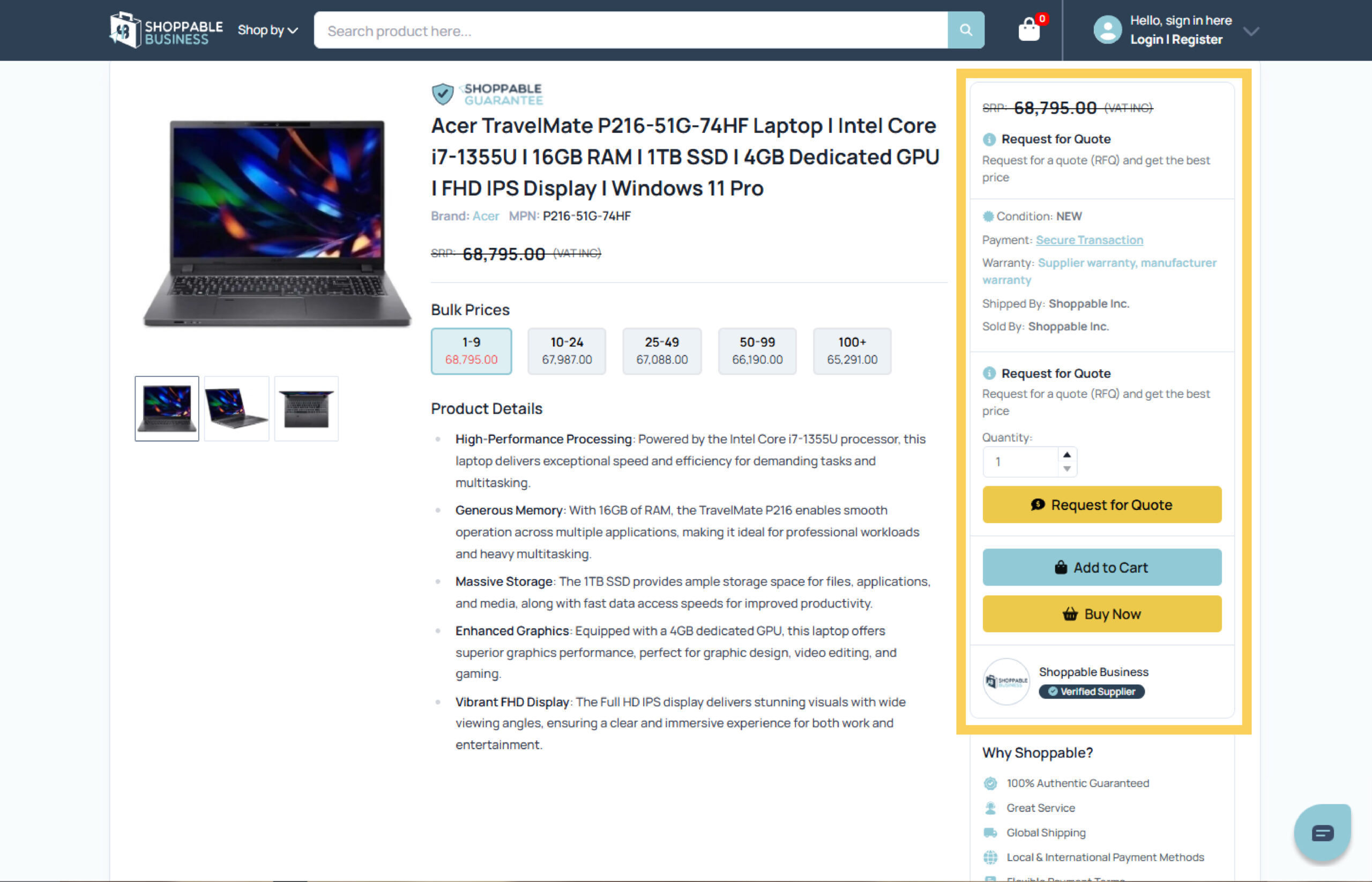
Shoppable BuyBox is the offer module on each product detail page that identifies and highlights the best purchasing option for a buyer, while still allowing quick access to alternate offers. It standardizes the most important commercial details in one place and provides clear calls-to-action for business purchasing.
Where is the BuyBox located?
- Desktop: the offer panel on the right side of the product page.
- Mobile: appears at the top of the page and remains sticky for easy access as buyers scroll.
- The UI does not need to display the words “BuyBox”; it is simply the offer panel.
What the BuyBox shows
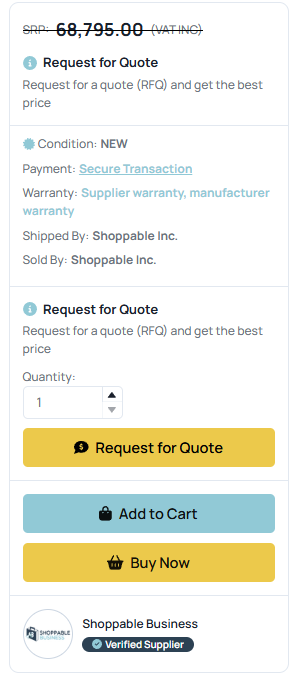
- Current price (with SRP/ERP strike-through if applicable) and VAT/GST tags
- Quantity selector and minimum order quantity
- Condition (new/refurbished), warranty details, and return policy
- Payment method and transaction security
- Delivery promise (lead time, shipping speed, cost) and stock status
- Shipped by / Sold by labels and supplier verification badge
- Primary actions: Buy Now, Add to Cart, or Request for Quote (RFQ)
- Compliance notes (e.g., restricted items) and any marketplace badges
How does the Shoppable BuyBox Work?
- Multiple sellers can list offers for the same catalog item. The BuyBox algorithm selects one “Primary Offer” to feature and displays a link to “More buying options” when alternates exist.
- The selection optimizes for buyer value and reliability using signals such as:
- Landed price (item price + shipping + taxes/fees)
- Availability and lead time to deliver
- Seller performance (on-time shipment, cancellations, order defect rate, ratings)
- Service terms (warranty/returns), verified status, and policy compliance
- Buyer context (location, quantity, negotiated terms, contract pricing)
- For items that require quoting or configuration, the BuyBox prioritizes the RFQ action. For immediately purchasable items, it shows Add to Cart and/or Buy Now.
- The module updates dynamically based on selected variants, ship-to location, and quantity breaks.
Buyer Benefits
- One clear place to evaluate the best offer and check out faster
- Transparent commercial terms (price, warranty, delivery, seller identity)
- Consistent experience across all products and suppliers
- Easy switch to alternate offers when needed
Seller Benefits
- Fair, performance-based exposure for every product
- Tools to compete on landed price, delivery, and service—not just base price
- Access to analytics on BuyBox wins/losses and RFQ responsiveness
- Support for both instant purchase and quote-driven B2B workflows
RFQ flow (for quote-first items)
- Buyer selects quantity/specs in the BuyBox and submits an RFQ.
- Qualified suppliers respond with pricing and terms.
- The accepted quote is surfaced back in the BuyBox for checkout under secure payment.
How to win the BuyBox
- Keep landed prices competitive and transparent.
- Maintain healthy inventory and accurate lead times.
- Ship on time and minimize cancellations/defects.
- Respond to RFQs rapidly and completely.
- Provide clear warranties/returns and earn/maintain Verified Supplier status.
Questions? We’re here to help.
- Contact form: shoppable.ph/contact-us
- Got something in mind? Don’t hesitate to email us and we’ll get in touch with you: [email protected]
- Call us
- Land Line: (02) 8 6719331
- Viber: +63 920 977 6501
- WhatsApp: +63 917 629 2202
- Support
- Our support center is always available to help you out: Support Center